What if the battery dies mid-update? Updating hardware in the field over a link you can't trust
Updating software on a laptop is a solved problem. You're sitting in front of it, it's plugged in, the Wi-Fi is good, and if something goes wrong you can see it.
Now picture the device in the field. No screen, no keyboard. The only way in is your phone's Bluetooth link, which drops when you walk away. It might be running on a battery pack. If an update goes wrong halfway, the fix is to take the device apart and rewrite its memory card on a computer.
Every hardware team I know has a story about the update that bricked a device in the field. For Kestrel, I wanted the opposite story: an update that can fail at any step, for any reason, and still leave the device working.
Kestrel is my nights-and-weekends project, built with Claude as my AI teammate: an open-source Raspberry Pi device for authorized Wi-Fi security research, with a dashboard on your phone. It's unaffiliated with my employer, and the views here are my own.
Rule one: do the risky network part first
The least reliable thing in this picture is the network link. So the update is split in two, with a hard line between them:
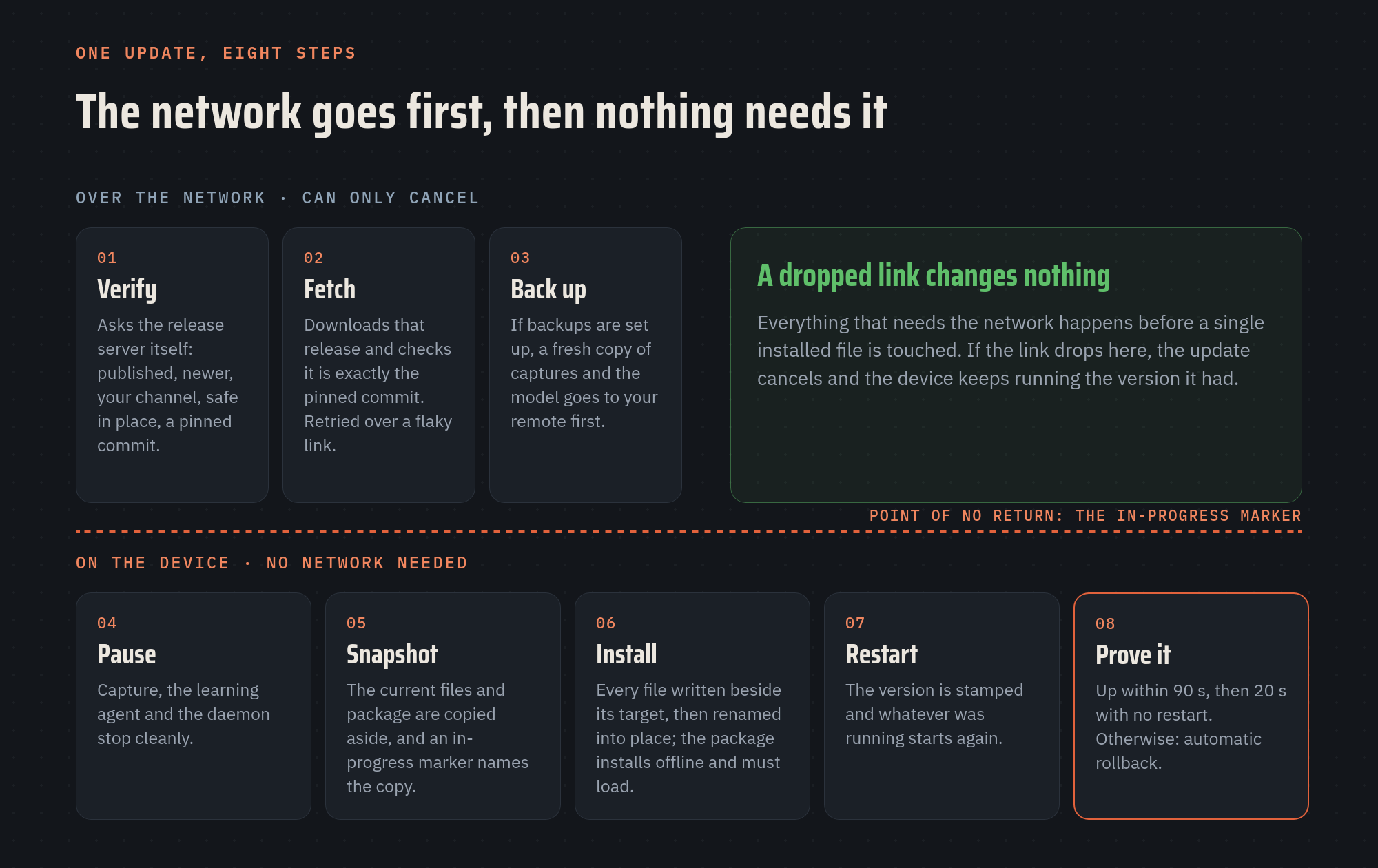
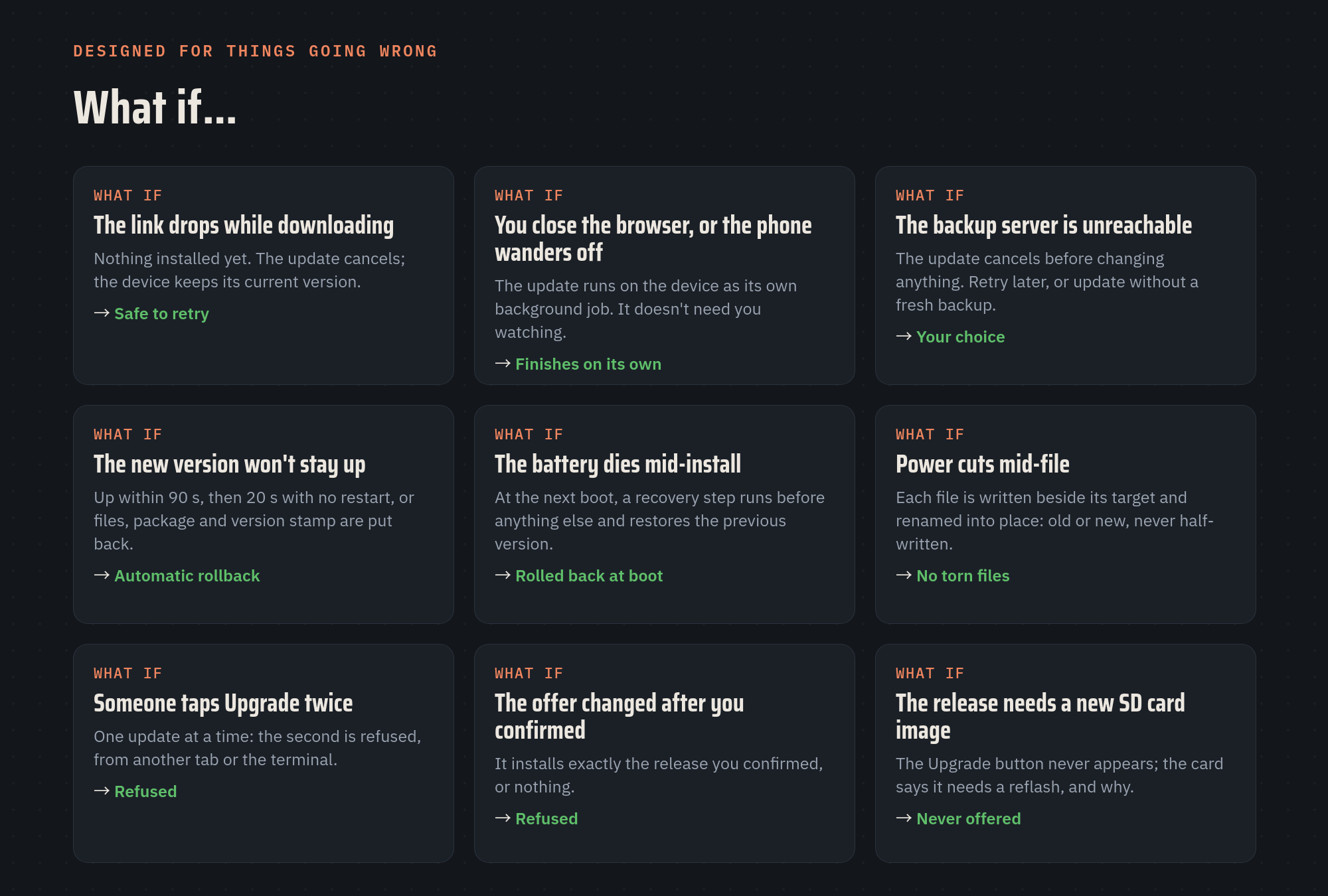
- Over the network: verify the release, download it, and (if you've set up backups) copy your captures and model to your backup server. Each step is retried over a flaky link. If the link drops here, the update simply cancels. Nothing installed has changed, and the device keeps running the version it had.
- On the device: everything else. The new software installs offline, because an in-place update never adds anything that would need to be downloaded mid-install. Once this phase starts, the link can do whatever it likes.
The point of no return is a single small file, an "in-progress" marker, written only after the current version has been copied aside. That one detail is what makes the rest of this post possible.
Rule two: trust nothing you didn't verify
The device runs the update with full system rights, so it is careful about who decides what gets installed:
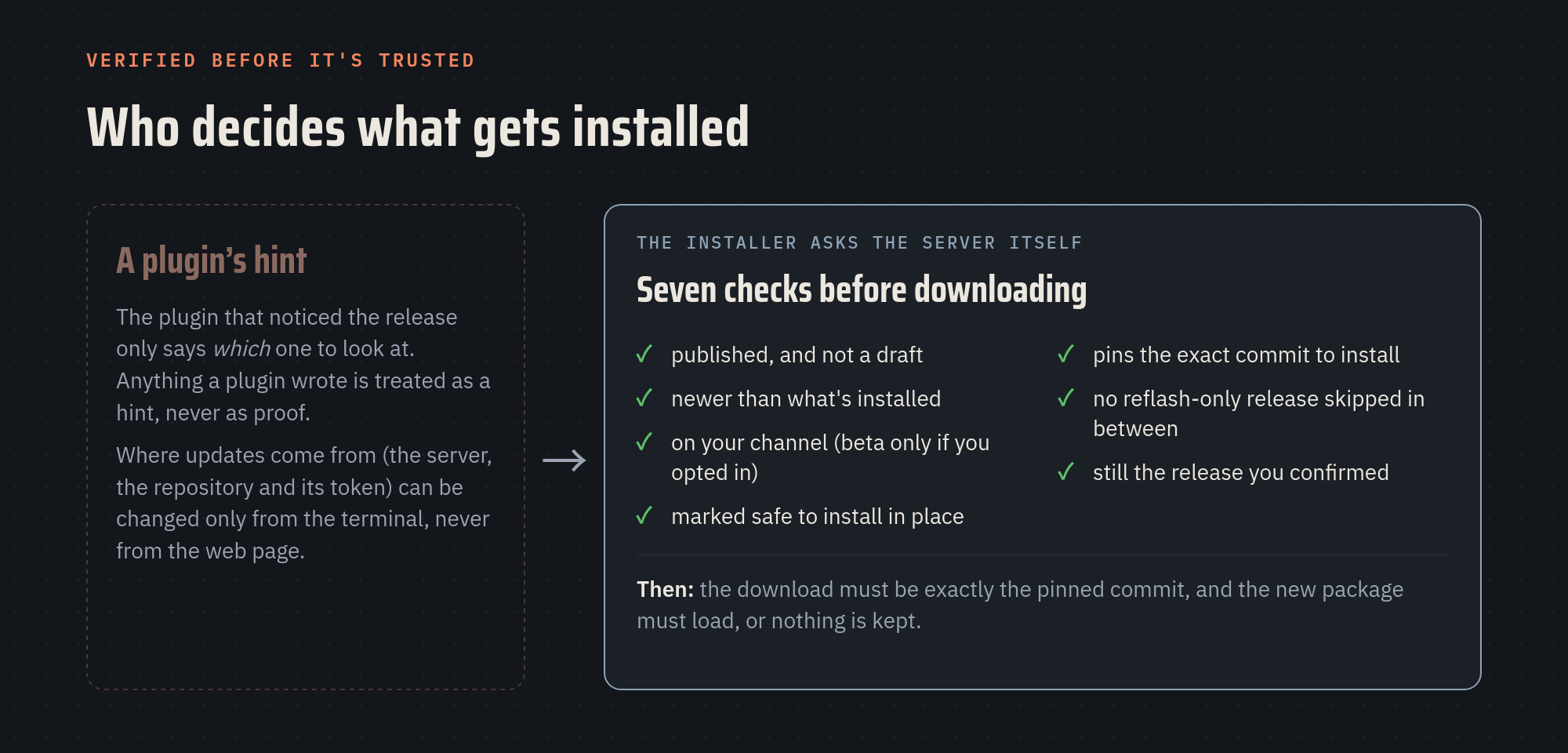
- The plugin that notices a new release only says which release to look at. Anything a plugin wrote is treated as a hint, never as proof.
- The installer then asks the release server itself, and refuses the release unless it passes all seven checks: published and not a draft, newer than what's installed, on your channel, marked safe to install in place, pinned to an exact commit, with no "needs a reflash" release skipped in between, and still the release you confirmed on the screen.
- The download must match that pinned commit exactly, and the new software must load before anything is kept.
- Where updates come from (the server, the repository and its access token) can be changed only from the device's terminal, never from the web page.
Rule three: prove it's healthy, or put it back
Installing isn't the finish line; running is. After the new version starts, the device watches it: it must come up within 90 seconds, then run for 20 more without restarting. If it doesn't, the update is rolled back automatically: files, software package and version stamp. The previous version starts again.
Rule four: assume the power will go out
This is the question that turned a good update system into a robust one: what happens if the battery dies in the middle of the install?
- No half-written files. Every file is written next to its target and then renamed into place in one step. After a power cut, each file is either the old one or the new one, never a torn mix.
- A boot-time recovery. Because the "in-progress" marker is still there, the next boot runs a recovery step before the dashboard, capture or the learning agent start. It restores the previous files, package and version from the copy the marker names. Until it has run, no new update is allowed.
- The system underneath is never touched, so the device always boots, whatever happened mid-update.
One honest caveat: during the minute or two of the install, the plugin that watches a UPS battery and shuts the device down cleanly when it runs low is paused along with everything else. So the advice is still to update on external power or a charged battery. If the battery dies anyway, the recovery puts things back.
Rule five: make the human part safe too
Most update disasters start with a person, not a bug: a double tap, a closed browser, a phone that wandered off. So the screens are part of the safety design:
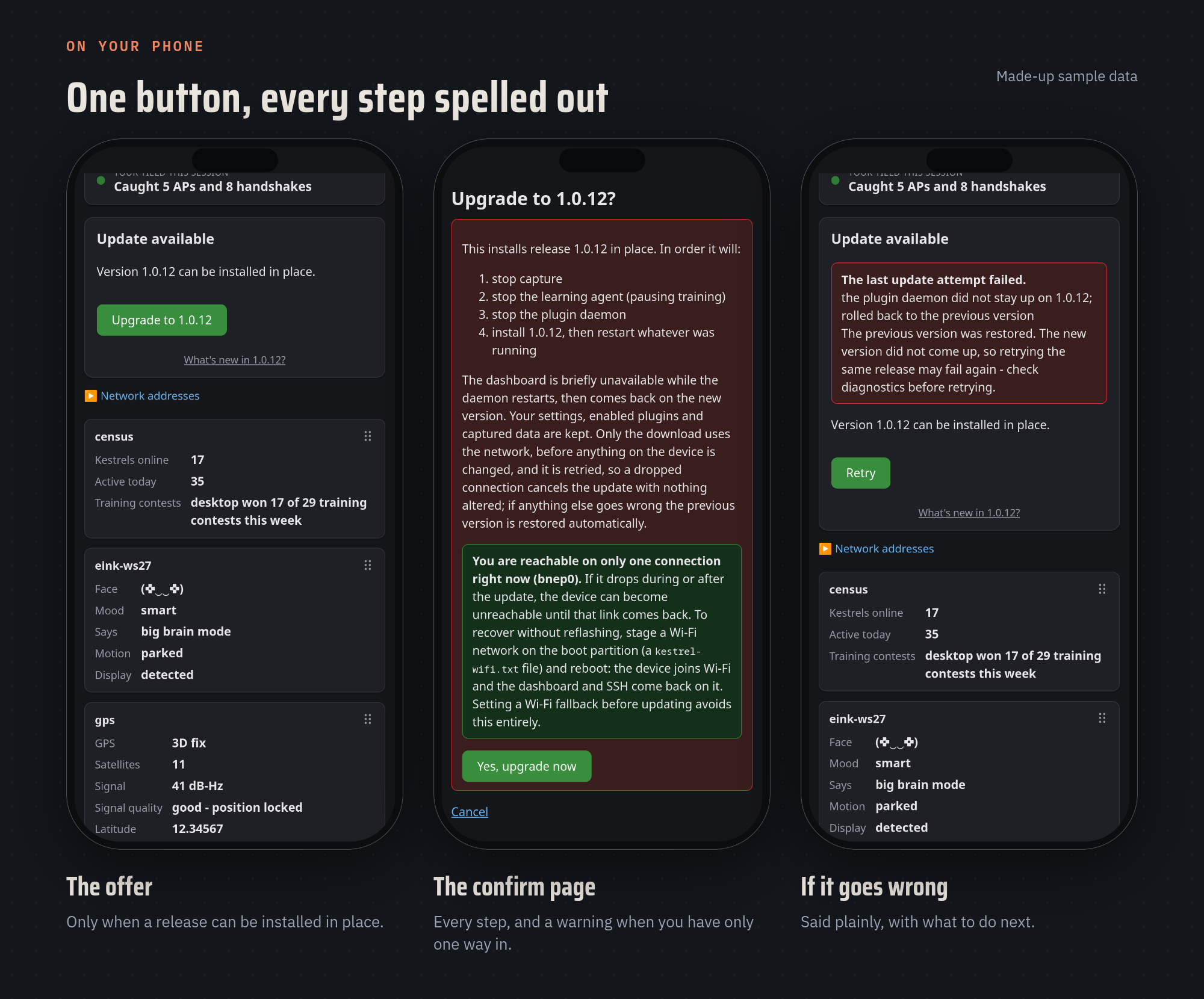
- The confirm page spells out every step before you commit: what stops, what restarts, what's kept.
- It warns you when you have only one way in. If the phone's Bluetooth link is your only connection, it says so and explains how to get back in without reflashing if that link doesn't come back.
- The update runs on the device as its own background job. Close the browser, lose the phone's signal or walk away: it finishes on its own.
- One update at a time. A second tap, from another tab or from the terminal, is refused.
- Exactly the release you confirmed, or nothing. If the offer changed after you tapped, it doesn't install a different one.
- Failures are said plainly, with what to do next: "nothing was changed, safe to retry", or "the previous version was restored, check diagnostics first".
Put together, the failure cases look like this:
Knowing when not to update in place
The safest in-place update is the one that never tries something it can't do. Some releases change the system underneath Kestrel (system packages, the kernel, the capture engine, new default settings), and those need a fresh memory card image:
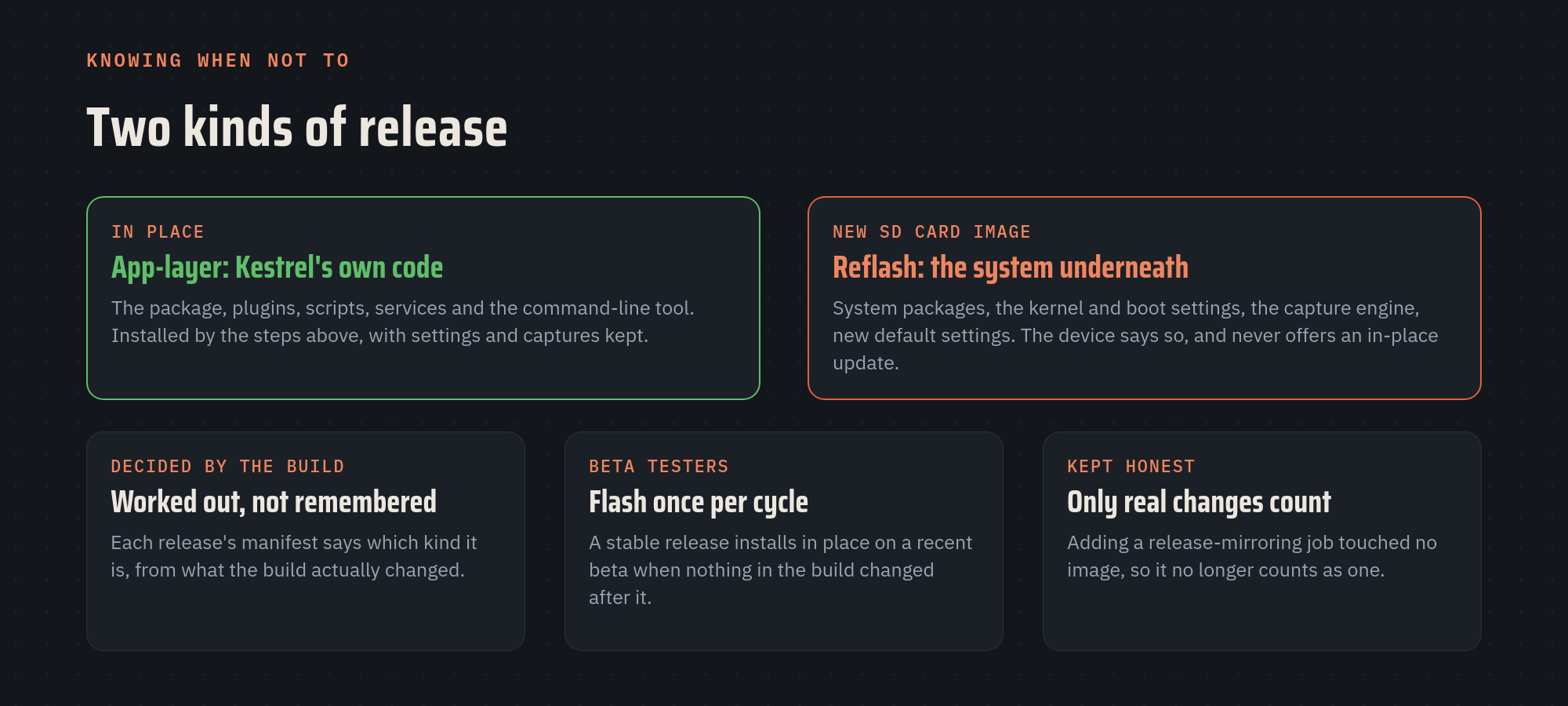
- Worked out, not remembered. Each release carries a small manifest saying which kind it is, generated from what the build actually changed. A device on a release that needs a reflash never sees an Upgrade button, just a note saying why.
- Beta testers flash once per cycle. A stable release installs in place on a recent beta when nothing in the build changed after it.
- Only real changes count. When I added a job that mirrors releases to GitHub, the old rule counted it as a build change and would have made everyone reflash for the next release. The rule now counts only what can change the image.
Did it work?
There are 122 automated tests for updates, including one that interrupts an update halfway and checks that the next boot rolls it back, and one that checks a new update is refused until that has happened. Every beta is then installed in place on a real Raspberry Pi 5 and checked by Kestrel's on-device check script before the stable release ships. The last one went from 1.0.11 to the 1.0.12 beta in under three minutes, over the same kind of phone link this post is about.
For engineering leaders
- Order operations by risk. Put everything that can fail for outside reasons (network, servers, people) before the point of no return, and make that point as late and as small as you can.
- Design for power loss on day one. It's cheap at the start and very expensive to bolt on after the first bricked device.
- Verify, don't trust. Anything a less-privileged part of the system wrote is a hint, not a decision.
- The UI is part of the safety system. A clear confirm page and plain failure messages prevent more incidents than another retry loop.
Working with an AI teammate changed the economics of the unglamorous part. Failure-path tests (the interrupted update, the dropped link, the double tap) are exactly the tests teams skip when time is short. Here they took minutes to write, so none of them got skipped.
For investors
In connected hardware, the update system is the product's future: it's how every fix and feature reaches devices already in customers' hands. A team that can update safely over a bad link can keep improving a product after it ships; a team that can't is one bad release away from a support crisis. When you look at a hardware company, ask what happens if the power goes out mid-update. The answer tells you how much they've thought about their customers' worst day.
If posts like this are useful to you, subscribe and the next one lands in your inbox.
What's the worst update story from your team, and what would have prevented it? 🪶
Kestrel is a personal, open-source project built on nights and weekends, unaffiliated with my employer, and for authorized testing only. The user guide and source are public.
Member discussion