Counting Kestrels, not people: how we built an anonymous census with no server
Every product team I've led could answer one question in seconds: how many people use this? There's a dashboard for it, fed by a server that quietly collects a little about everyone.
Kestrel couldn't answer it, on purpose. It's a device for studying Wi-Fi security, and the people who build one care about privacy more than most. A device like that phoning home is exactly what they'd worry about, and they'd be right to.
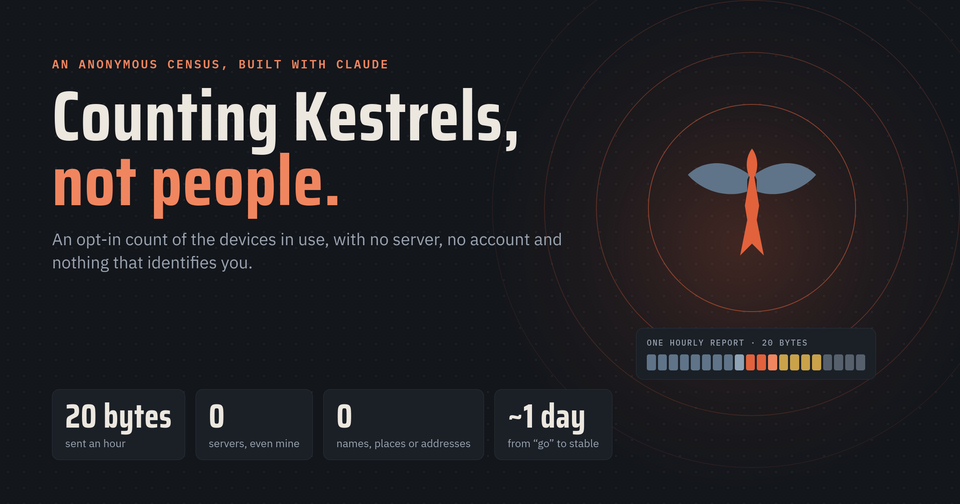
I still wanted to know. How many Kestrels are out there? Which releases are they running? Does training the learning agent on a desktop actually beat training it on the device? So, working with Claude, the AI teammate I build Kestrel with, we set ourselves a harder question: what is the least a device could send and still answer those questions, with no server, no account and nothing that points back at a person? The answer shipped in Kestrel 1.0.12, about a day after the design was approved.
Kestrel is my nights-and-weekends project: an open-source Raspberry Pi device for authorized Wi-Fi security research, with a dashboard on your phone and an optional e-ink face. It's unaffiliated with my employer, and the views here are my own.
Start with what not to collect
Most telemetry starts from "what could we collect?" We started from the other end, and kept cutting. A report ended up as 20 bytes, once an hour:
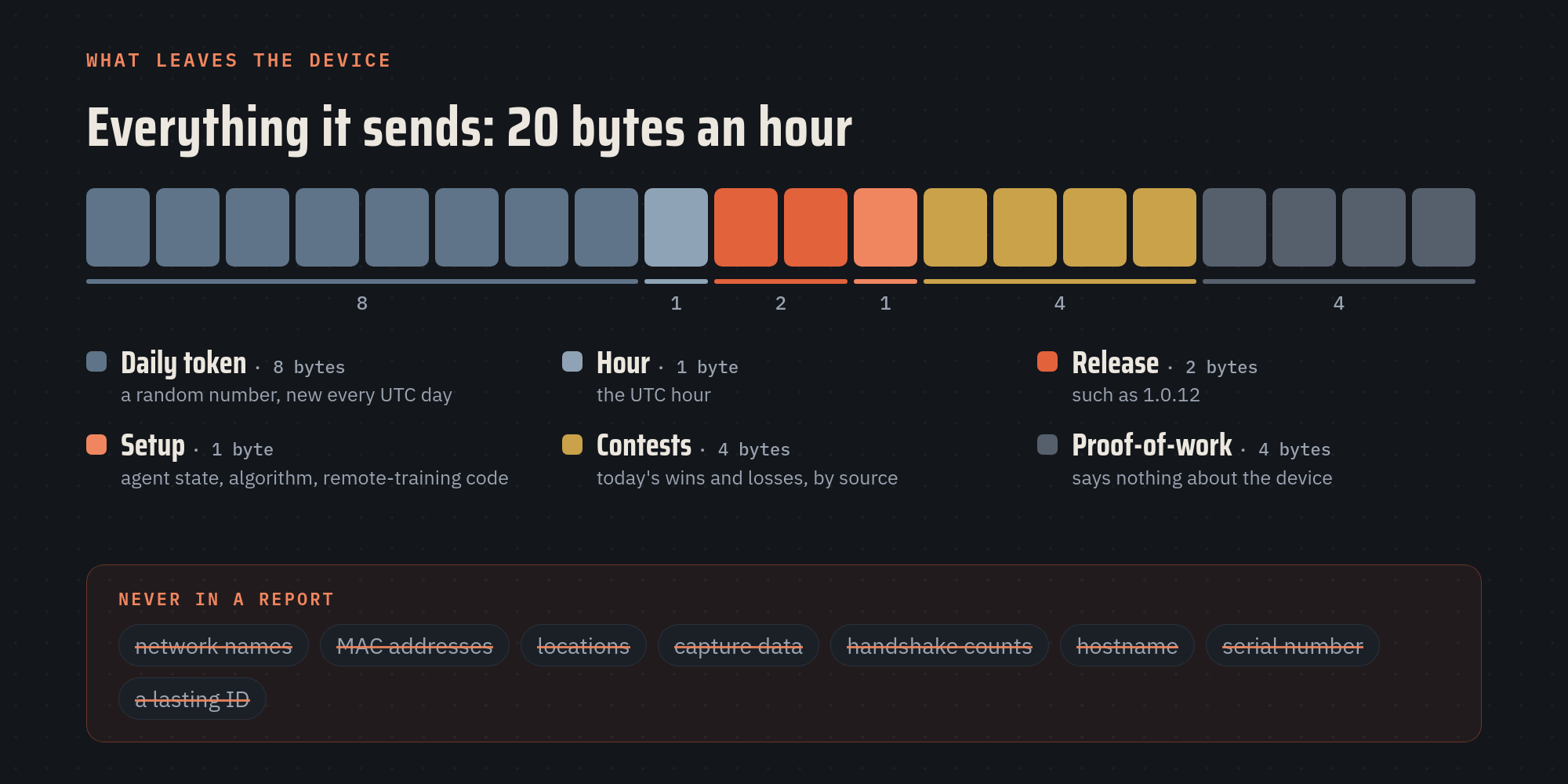
Three of the cuts taught me the most:
- The most interesting number was the one we shouldn't collect. The first draft counted handshakes, the thing a Kestrel captures. A fleet-wide total would have made a great headline. It would also have rewarded capturing more, and most networks in range of a device belong to somebody else. Kestrel is for testing networks you own or have permission to test, so a number that nudges the other way doesn't belong in it. We cut it in the second draft.
- Today's counts, not lifetime totals. A lifetime tally changes slowly and becomes a fingerprint over time. Daily counts start over at midnight.
- A new random number every day. It exists only so a device counts once a day. It isn't made from anything on the device, and it isn't kept from one day to the next.
What's left answers the questions and nothing else: which release, how the learning agent is set up, whether remote training works, and how many training contests each kind of model won today.
No server, on purpose
The usual way to count devices is a server they check in with. A server like that also becomes a database of internet addresses and versions, one more thing to secure and look after. The simplest way to protect data like that is never to collect it.
So there is no server, not even one I run. Reports go into the public BitTorrent DHT, the shared directory millions of torrent clients already use to find each other. Each day has 64 shared public records; a device merges its report into one of them, and every Kestrel reads the same totals back. Anyone can count them, including with a desktop script in the repository.
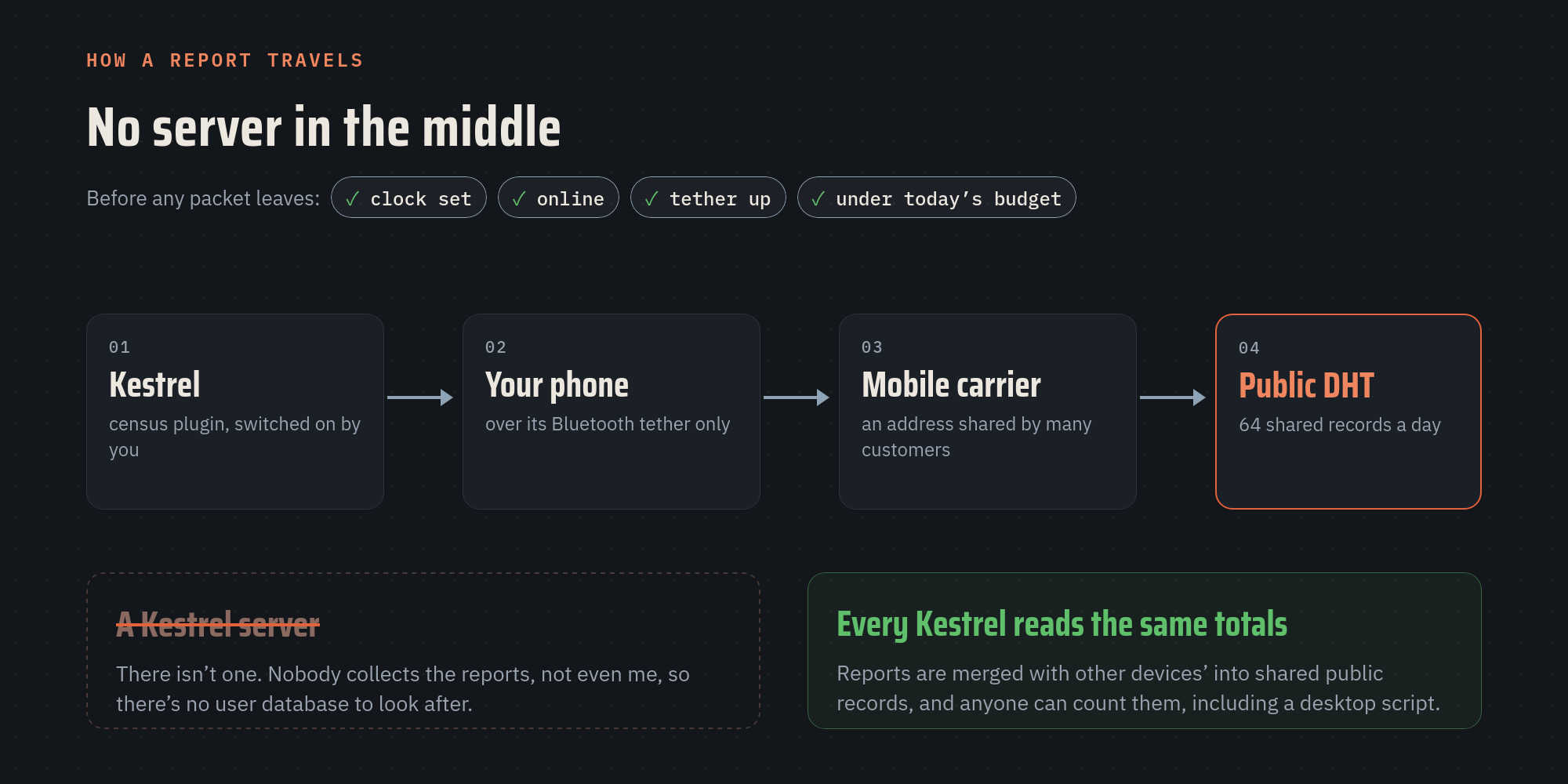
We were upfront about what the network itself can see. The computers that store the census see the internet address each report comes from, like any internet service would. That's why, by default, the census sends its reports and reads only over your phone's Bluetooth tether: the address the network sees is then your mobile carrier's, shared by many of its customers. Without the tether, the census simply pauses. It doesn't even look up the network's entry points until the tether is up.
Measure before you build
Before writing the plugin, we wrote a throwaway one. On October 29, a quick client on a desktop wrote reports to the public network, read them back from a fresh start, and measured how much data each step cost. On October 31 we ran the same tests on a Raspberry Pi 5 over a phone tether, and the device taught us things a desktop couldn't:
- The tether really can be enforced. The plugin pins its network connection to the tether: even with home Wi-Fi up and preferred, its reports and reads still left over the tether.
- Tethers come and go. One test lost the tether in the middle of a write, so the design pauses cleanly and picks up again, instead of failing or falling back to Wi-Fi.
- The data cost is small. From the measured cost of each write and read, it comes to about 4 MB a day with the defaults, under a 5 MB daily budget the plugin enforces itself.
The throwaway code was deleted. Its numbers went into the design.
Eight decisions, made before the code
Claude wrote the design document: the options, the trade-offs and what each would cost. I signed off on every decision before a line of the plugin was written:
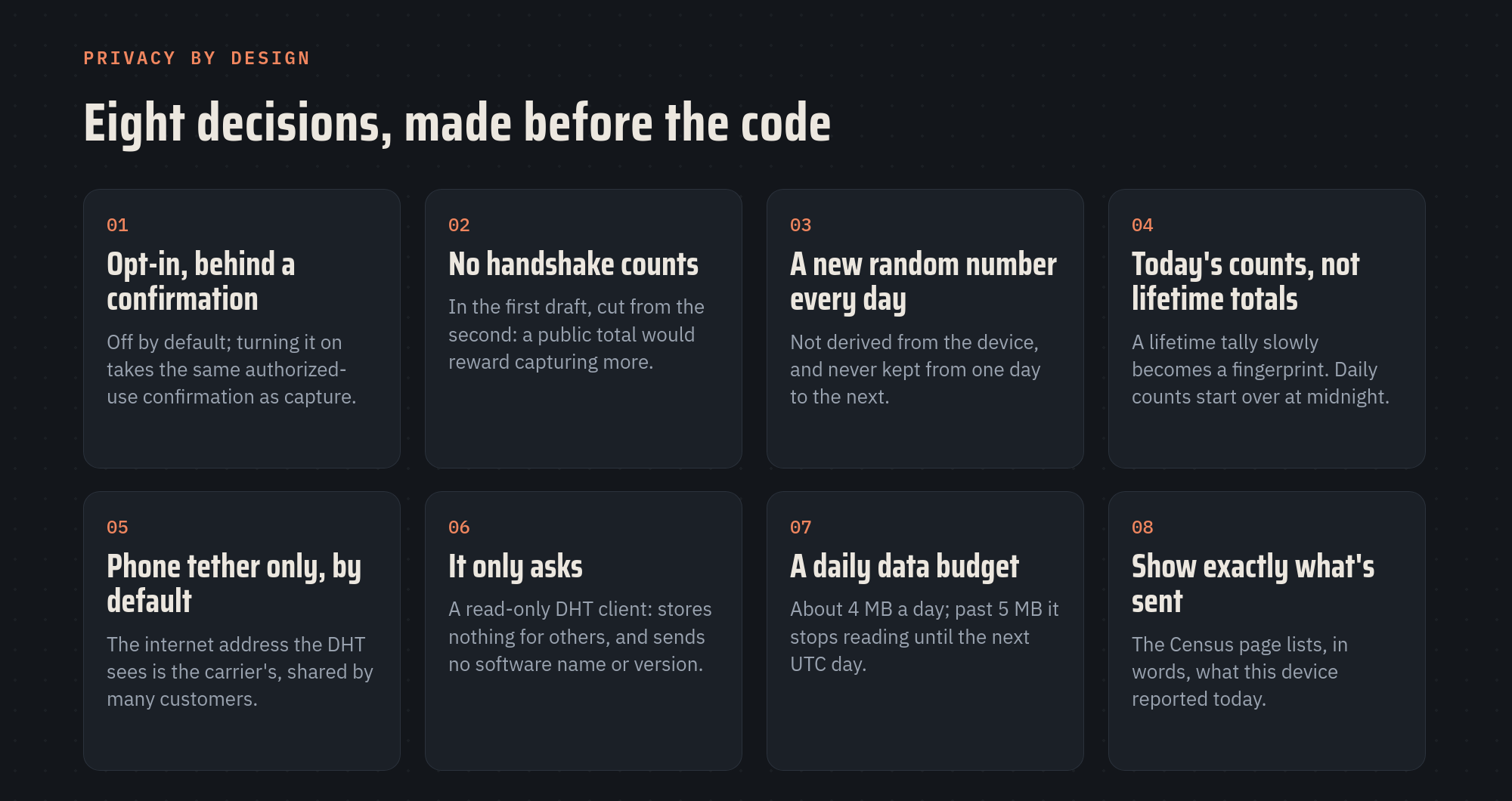
The census also had to follow the project's existing rules, which are written down and read by Claude at the start of every session. It ships switched off, and turning it on takes the same "I'm authorized" confirmation as capture. It runs as an ordinary plugin with no new privileges and no new software packages. Its network client was written for this one job, about 730 lines with no BitTorrent library behind it: it only asks, never stores or relays anyone else's data, never announces a software name or version, and treats every byte from the network as untrusted, with strict size limits on everything it reads.
One more habit, because the project is public: its documentation explains what the census does and how to use it. The trade-offs we accepted along the way are written down too, but in a private register, never in the public repository. A public project still needs a private risk list.
Show your work
Privacy claims are easy to make. So the device shows you, in plain words, exactly what it reported today, at the bottom of the Census page on your phone:
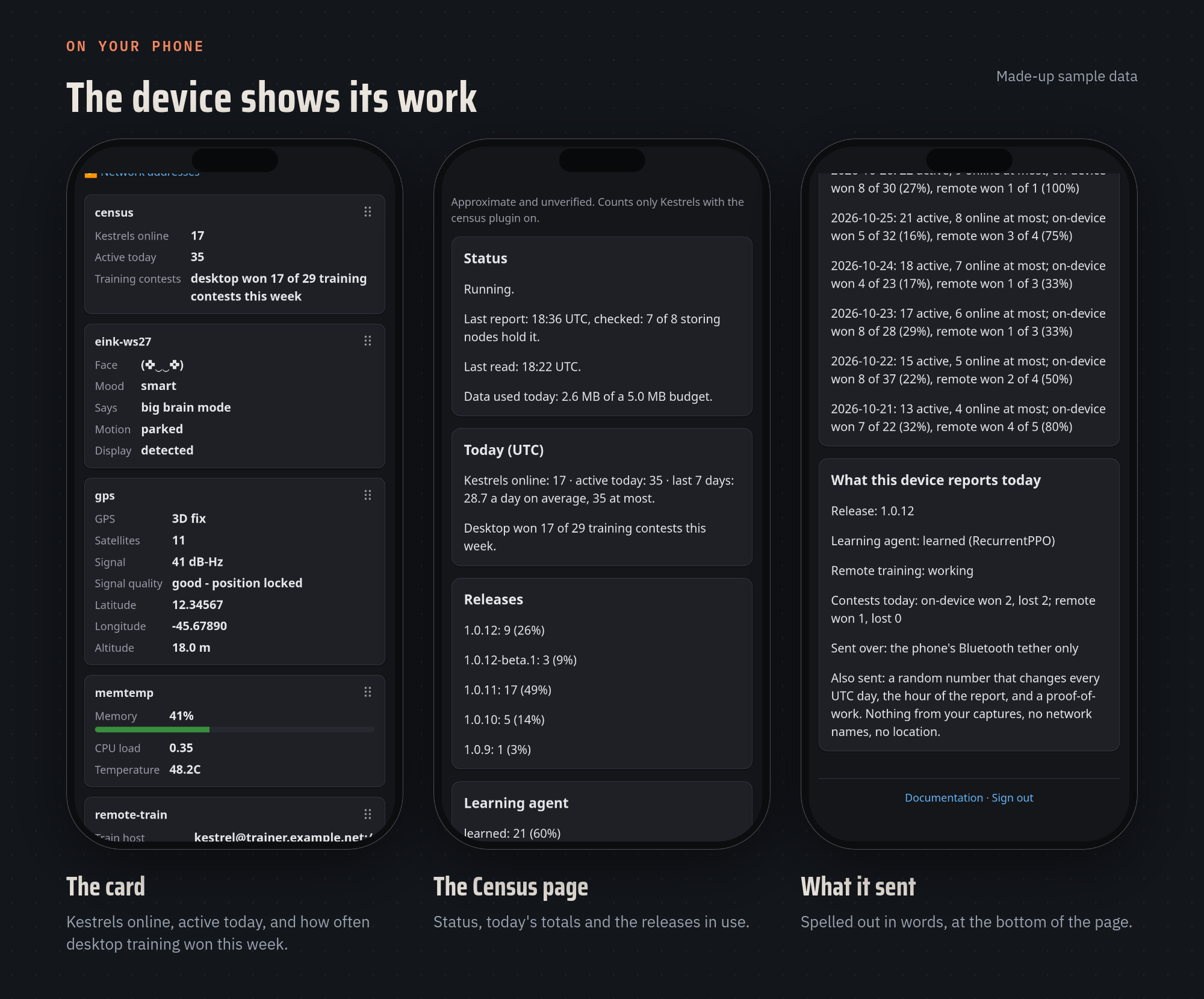
The report format is documented in the repository, and a desktop script reads the whole census in about two minutes. Nothing about it depends on taking my word for it.
Built, then checked on a real device
The plugin, its network client and the desktop report came to about 2,500 lines of Python, with 93 automated tests that run against a fake, in-process network, so the tests never touch the real one. They arrived as a single reviewed pull request, went out as a beta to the devices that opt into betas, and were checked on a Raspberry Pi 5 by Kestrel's read-only, on-device check script before the stable release.
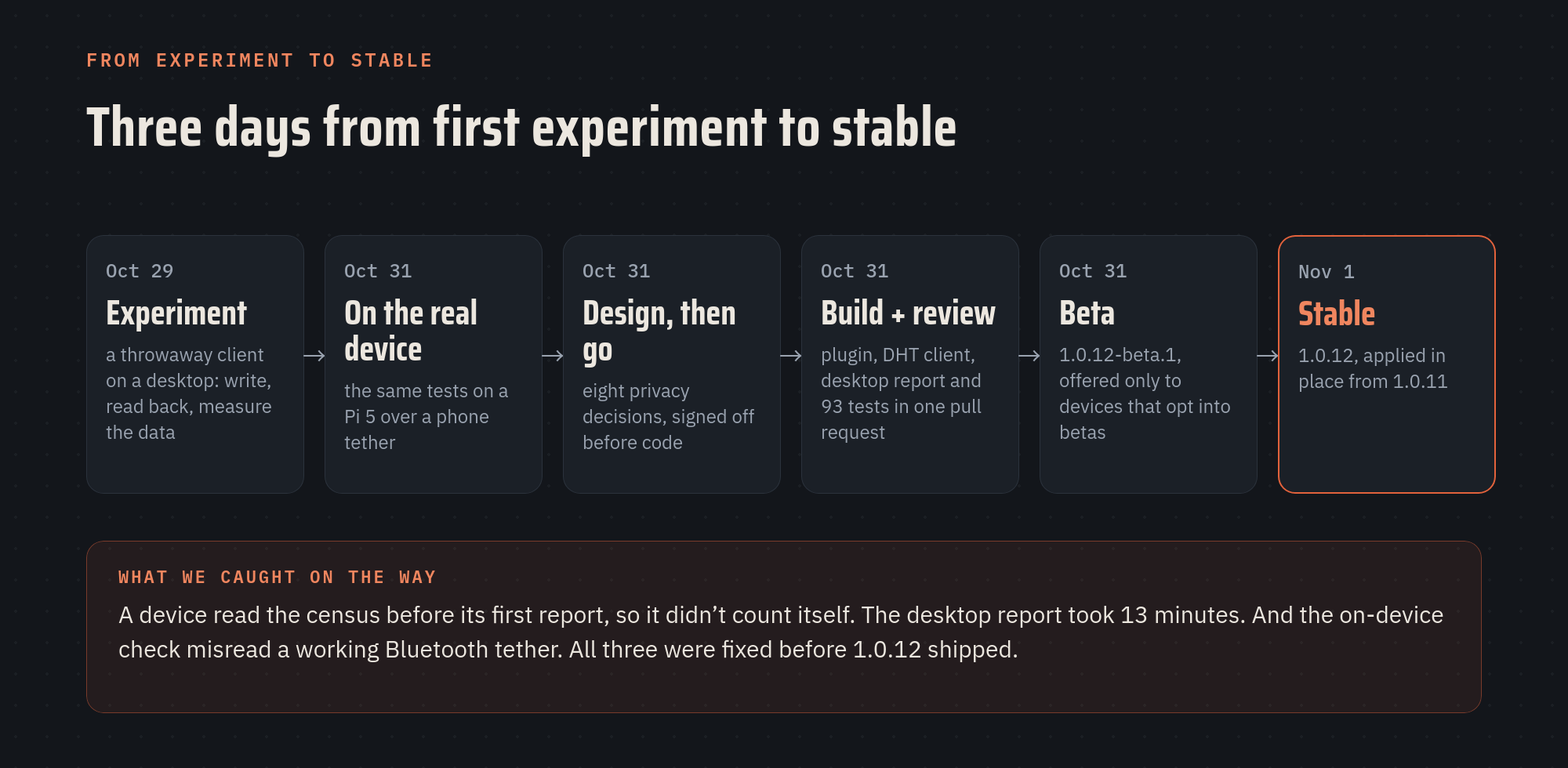
Using it found three things before any user did:
- A device didn't count itself. Its first read of the census could come before its first report. Reads now wait until just after the first report.
- The desktop report took 13 minutes, reading the 64 records one at a time. It now reads eight at a time and finishes in about two.
- The check script was wrong, not the plugin. It skipped a check because a working Bluetooth tether reports its state as "unknown". We fixed the check before shipping.
When the device's card and the desktop report agreed on the count, I was ready to ship.
The number I wanted most
The card's last line reads "desktop won X of Y training contests this week". That number only means something because of the release before. Kestrel 1.0.11 made every new model, trained on the device or on a desktop, win a fair contest on data no model had trained on before it can replace the one in use. The census adds those results up across every Kestrel that reports. For the first time, I can see whether desktop training pays off across the fleet rather than on my one test device.
For engineering and product leaders
- Privacy is a design input, not a review step. Every decision above was cheaper to make on paper than it would have been to undo in code.
- The best metric might be the one you shouldn't collect. Ask what each field rewards, not just what it tells you.
- AI changed the cost of doing it right. The expensive parts (exploring options, measuring before building, writing careful code and its tests) took hours instead of weeks. When the safe path is that cheap, there's no longer an excuse for the fast-but-sloppy one.
For investors
Trust is a moat, especially in security products and connected devices. Usage data usually costs some of that trust. This shows a small team can now get the data without paying that cost, and ship it in days. When you look at a team, ask what they chose not to collect, and why. The answer tells you how they'll treat their users when nobody is checking.
Help count
If you run Kestrel, update to 1.0.12 (it applies in place from 1.0.11) and consider switching the census on. With your phone's tether set up, it's one command, sudo kestrel plugins enable census, or one switch on the Plugins page. Every device that reports makes the numbers better for everyone, and tells me where to spend my nights and weekends next. Kestrel is now mirrored on GitHub too, so issues and pull requests are welcome there.
If posts like this are useful to you, subscribe and the next one lands in your inbox.
What's the metric your team collects that it shouldn't? 🪶
Kestrel is a personal, open-source project built on nights and weekends, unaffiliated with my employer, and for authorized testing only. The user guide and source are public.
Member discussion